How to Check Vape Inventory: 2026 Shop Guide

How to Check Vape Inventory: 2026 Shop Guide
Checking vape inventory is the process of verifying and managing your shop’s stock through physical counts, barcode scanning, and real-time point-of-sale integration. For vape shop owners and managers, knowing how to check vape inventory accurately is the difference between a profitable operation and one plagued by stockouts, expired product, and compliance failures. The 2026 standard for disposable vape stock management combines cycle counting, POS data sync, and FIFO placement to keep records accurate and shelves stocked with the right products.
What do you need before checking vape inventory?
Accurate inventory checking starts with having the right tools in place before you count a single unit. Without them, even the most disciplined counting routine produces unreliable data.
Hardware requirements:
- Barcode scanner or mobile device: Barcode scanning reduces human error during physical counts compared to manual entry. A wireless handheld scanner or a smartphone with a scanning app works for most shop sizes.
- Point-of-sale system with inventory module: Your POS must support real-time inventory sync. When a sale processes, stock levels should update automatically without manual adjustment.
- Printer for shelf labels: Consistent barcode labels on every SKU make scanning fast and error-free.
Data you must have ready:
| Data Type | Why You Need It |
|---|---|
| Purchase orders | Verify incoming shipments against what was ordered |
| Reorder points | Trigger restocking before shelves run empty |
| Sales reports | Identify fast-moving SKUs and dead stock |
| Supplier product codes | Match received goods to system records accurately |
Software requirements:
Your inventory management system must support real-time sync, custom reorder alerts, and exportable reports. Cloud-based systems give you access from any device, which matters when you are checking stock levels remotely or troubleshooting vape orders with a supplier.
Pro Tip: Before your first count, audit your SKU list. Remove discontinued products and add any new disposable vape flavors or nicotine strengths you have received. A clean catalog makes every future count faster.
How do you perform a vape inventory check step by step?
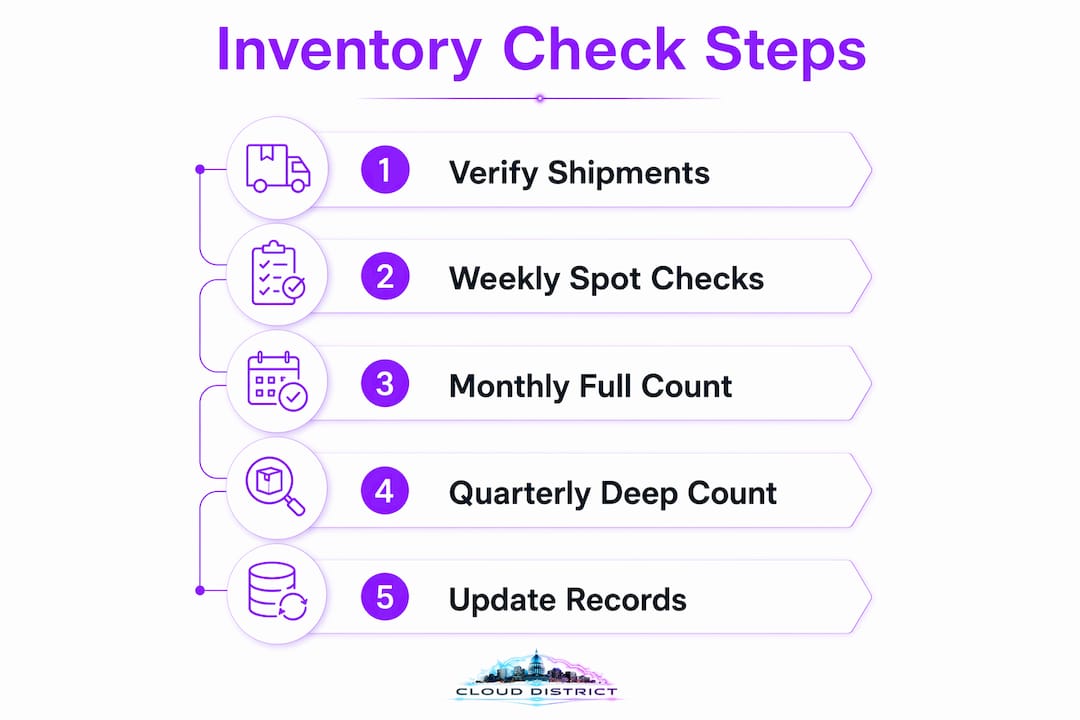
Industry best practices recommend weekly spot checks, monthly full counts, and quarterly deep counts for vape inventory verification. Each level serves a different purpose and catches different types of errors.
Step 1: Verify shipments at receiving
Check every incoming delivery against its purchase order before the product touches your shelves. Count units, confirm SKUs, and note any discrepancies on the delivery receipt. Verifying shipment quantities against purchase orders on delivery reduces discrepancies significantly. This single step prevents the most common source of inventory errors from entering your system.

Step 2: Perform weekly spot checks
Select 10–20 high-value or fast-moving SKUs each week. Count them physically and compare the result to your system record. Weekly spot checks on select items catch theft, damage, and miscount errors earlier than full audits. Rotate which SKUs you check so every product gets reviewed at least once per month.
Step 3: Run a monthly full count
Once a month, count every product in the store. Assign staff to specific sections to avoid double-counting. Use barcode scanners to record counts directly into your inventory system. Update records immediately after the count is complete, not the following day.
Step 4: Conduct quarterly deep counts
Every quarter, run a full reconciliation that compares your system records against physical counts and purchase order history. This is where you identify patterns: recurring shrinkage in a specific product category, a supplier who consistently ships short, or a flavor that is accumulating dead stock.
Step 5: Update system records immediately
Every count is worthless if the data sits on a clipboard for three days. Enter adjustments into your inventory system the same day. Manager approval should be required for any adjustment above a set threshold, which creates an audit trail and discourages casual overrides.
Pro Tip: Automated cycle counts save vape shop managers approximately 1 hour of labor daily per location. If your POS supports scheduled cycle count prompts, turn that feature on. It removes the reliance on staff memory.
How do you fix common vape inventory discrepancies?
Inventory discrepancies in vape shops most often originate during receiving. Immediate cross-checking is key to preventing those errors from compounding over time.
The most common causes of discrepancies:
- Receiving errors: A supplier ships 48 units but the invoice says 50. If no one counts at the dock, your system shows 50 and your shelf holds 48.
- Theft: Both external shoplifting and internal shrinkage. Weekly spot checks on high-value SKUs surface this faster than monthly audits.
- Miscounts: Manual tallying produces errors. Switching to barcode scanning eliminates most of these.
- Expired product removed without a system adjustment: A staff member pulls expired disposables from the shelf but never logs the removal. Your system still shows those units as available.
Enforcing FIFO to prevent expiration waste:
FIFO inventory placement reduces the risk of dead stock from expired vape products. Place new stock behind existing product every time you restock a shelf. This is especially critical for disposable vapes, which carry printed expiration dates and are subject to retail compliance requirements that prohibit selling expired nicotine products.
Discrepancies that go uncorrected for more than one count cycle become structural errors. They distort reorder calculations, inflate apparent stock levels, and eventually produce stockouts on products your system claims are fully stocked.
Correcting errors the right way:
Document every adjustment with a reason code: receiving error, theft, damage, or expiration. Require manager sign-off for adjustments above five units. This creates accountability and gives you data to identify whether a discrepancy pattern is a process problem or a personnel problem.
How does real-time data improve vape stock management?
Real-time POS integration prevents stockouts and reduces manual stock adjustments by syncing sales to inventory instantly. Every transaction updates your stock count without any manual input. That accuracy is the foundation for every other data-driven decision you make.
What real-time inventory tracking gives you:
- Automatic reorder alerts: Set a reorder point for each SKU. When stock drops below that threshold, your system flags it or generates a purchase order automatically.
- Safety stock buffers: Keep a minimum quantity on hand for your fastest-moving disposable vape flavors. This protects you against supplier delays.
- Demand visibility by SKU: See exactly which flavors and nicotine strengths sell fastest. Historical sales data helps optimize vape flavors and nicotine strengths stocked, reducing excess inventory.
- Compliance tracking: Real-time inventory management is critical not just for accuracy but for regulatory compliance, tracking batch numbers and expiration information.
Using dashboards to make faster decisions:
| Dashboard Metric | What It Tells You |
|---|---|
| Days of supply by SKU | How long current stock lasts at current sales pace |
| Shrinkage rate | Percentage of inventory lost to theft or damage |
| Sell-through rate | How quickly a product moves after receiving |
| Dead stock value | Capital tied up in products not selling |
Data-driven inventory decisions prevent capital from being tied up in dead stock while keeping your best sellers available. A shop that tracks sell-through rates by flavor can cut reorder quantities on slow movers and increase them on high-demand SKUs before a stockout happens. For guidance on managing the reorder process efficiently, the steps are straightforward once your data is clean.
Key Takeaways
Accurate vape inventory control requires combining physical cycle counts, barcode scanning, and real-time POS integration to prevent stockouts, discrepancies, and compliance failures.
| Point | Details |
|---|---|
| Count on a schedule | Use weekly spot checks, monthly full counts, and quarterly deep reconciliations. |
| Verify every shipment | Cross-check deliveries against purchase orders before stocking shelves. |
| Use barcode scanning | Scanning reduces human error and speeds up every count compared to manual tallying. |
| Enforce FIFO | Place new stock behind existing product to move older inventory first and prevent expiration waste. |
| Act on real-time data | Set reorder points and safety stock buffers so your system flags low stock before shelves run empty. |
What I have learned from years of watching vape shops manage stock
Most vape shop managers treat inventory as an annual event. They do one big count at year-end, find a mess of discrepancies, spend a week fixing it, and then go back to guessing. That approach costs real money.
The shops that run cleanly do one thing differently: they count small and count often. A 15-minute spot check on your top 20 SKUs every Monday morning tells you more than a four-hour full count once a month. It catches theft before it becomes a pattern. It surfaces receiving errors before they compound. It keeps your system data trustworthy enough to actually use for ordering decisions.
The other thing I see consistently is resistance to barcode scanning. Staff push back because it feels slower at first. It is not. After two weeks, scanning is faster than writing, and the error rate drops to near zero. Mobile barcode scanners reduce human error and speed up cycle counts compared to manual methods. That is not a minor efficiency gain. That is the difference between data you can trust and data you have to verify before every order.
Train your staff on the scanner, set up the reorder alerts, and do the spot checks. The technology does the heavy lifting once you build the habit.
— Justin
Cloud District’s disposable vape catalog for your inventory planning
Managing your disposable vape inventory starts with knowing which products your customers want most. Cloud District carries a curated selection of high-demand disposables that belong on every shop’s reorder list.

The CLIO Platinum 50K Pod in Sour Watermelon Drop and the CLIO Platinum 50K Kit in Cool Mint are high-turnover SKUs that move consistently across retail locations. Cloud District also stocks the full disposable vape catalog including Geek Bar and Pulse lines, giving shop managers a single source for popular flavors and nicotine strengths. Every purchase earns Cloudz rewards, and local pickup keeps your restocking timeline tight.
FAQ
What is vape inventory checking?
Vape inventory checking is the process of physically counting and verifying stock levels against system records using barcode scanning, cycle counts, and POS data. It covers all products in a vape shop, including disposables, pods, and accessories.
How often should a vape shop check its inventory?
Industry best practices recommend weekly spot checks on high-value SKUs, a monthly full physical count, and a quarterly deep reconciliation. This schedule catches errors early and keeps system data accurate.
What causes inventory discrepancies in vape shops?
The most common causes are receiving errors, theft, miscounts during manual tallying, and expired product removed without a system adjustment. Verifying shipments at delivery and using barcode scanning addresses most of these issues.
How does real-time inventory tracking help vape shops?
Real-time POS integration syncs every sale to your stock count instantly, eliminating manual adjustments and triggering automatic reorder alerts when stock drops below set thresholds. It also supports regulatory compliance by tracking batch numbers and expiration dates.
What is FIFO and why does it matter for disposable vapes?
FIFO stands for First In, First Out. It means placing new stock behind existing product so older inventory sells first. For disposable vapes with printed expiration dates, FIFO directly reduces the risk of expired product reaching customers.